Pedigree chart examples.
Same tool, four requests. Every drawing below is a real render.
Rather start from a finished drawing? Browse 32 pedigree chart templates →
What a pedigree chart is.
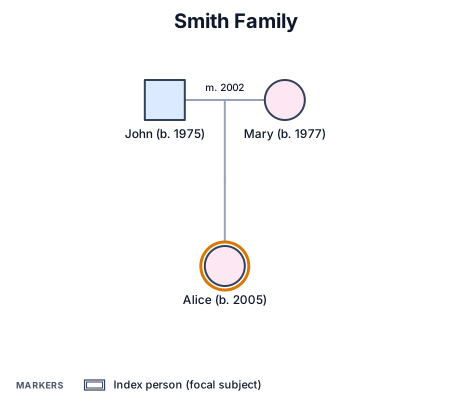
A pedigree chart is a standardized diagram of biological family relationships across generations. Different shapes represent sex, lines connect partners and children, and status markers can distinguish affected, carrier and unaffected individuals.
It is used to organize an inheritance pattern or family history in a compact form. The chart is a record and communication aid; it should be interpreted with the relevant subject-matter expertise.
- Standard
- NSGC Pedigree Standardization (Bennett 2008)
- Engine
- schematex-pedigree
- Editable
- Double-click text, drag nodes
- Export
- SVG · PNG · PDF
Who uses pedigree charts.
Examples for learning how inheritance patterns appear across generations.
A way to track known parentage and later litter or foal branches in an animal line.
A compact family-history diagram for studying pedigree notation and the role of a proband.
How to make a pedigree chart in three steps.
Describe it
One paragraph is enough to start.
See the drawing
Drawn by the right engine.
Say what changes
Every edit keeps a version.
Common questions
What is a pedigree chart?
It is a diagram that depicts biological relationships and relevant traits or genetic status across generations.
What do the shapes in a pedigree chart mean?
Pedigree charts use standardized shapes for sex and lines for partner and parent-child relationships.
What is the difference between a pedigree and a family tree?
A family tree records relationships broadly; a pedigree also uses standardized notation for biological and genetic information.
What should I include in a pedigree chart?
Include the relevant relatives, their biological relationships, the generations, and any known status needed for the chart's purpose.
Other drawings for the same work.
Make your pedigree chart now.
Free account, no card. Describe the relationships and traits you want to show.
Open the editor